
Native or React Native? It’s the age-old debate in app development. One gives you raw power and performance, the other gives you speed and a single codebase. It’s one of those decisions that every app developer faces and can either save you months of work or haunt you later. Although both approaches result in a functional app, it's essential to understand the distinction between the two to make an informed decision, especially when performance, platform integration, and scalability are top priorities.
Native Development
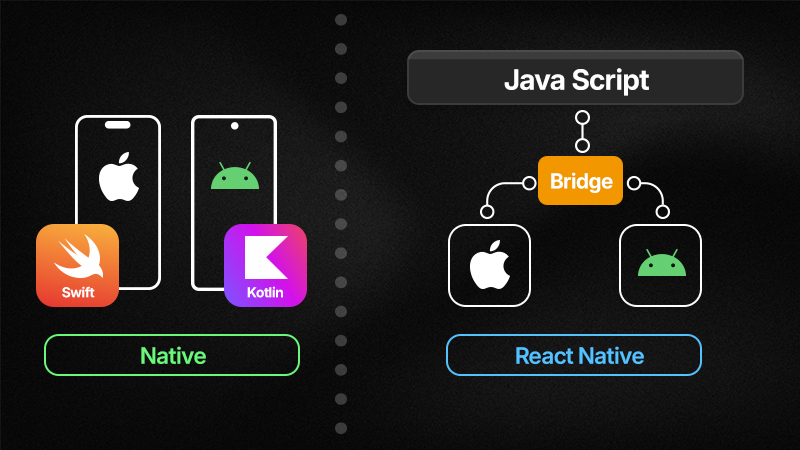
Mobile Native apps are coded using Swift or Objective-C for iOS development and Java or Kotlin for Android. This code runs directly on the device's OS allowing it to interact with the device's hardware.
The underlying software protocols (Native APIs) and built-in features are easily accessible and customizable. As a result, native apps can handle and process large amounts of data while still maintaining quick response times to requests.
However, one downside of this is that it requires a separate codebase than web development, which means expertise in different languages and platforms is required. For many companies, this tradeoff is worthwhile as native development gives the app developer full control over the app's behavior.
React Native
React Native Mobile App development uses JavaScript so that it can be shared across platforms.
Behind the scenes, there are two main threads that make this possible. The JavaScript thread that runs the app logic, and the native UI thread that handles rendering the user interface for the iOS or Android device. These threads communicate with each other through a "Bridge", sending commands back and forth asynchronously. A JavaScript engine executes the JavaScript code. (JavaScriptCore on iOS and Hermes on Android)
React's reconciliation system is a mechanism that updates the user interface and finalizes the changes onto the app. To access the device's hardware, React Native relies on native modules, which are pieces of native code that can be called from the JavaScript thread through the Bridge. Additionally, it uses a technique called hot reloading to instantly update the code and UI across all platforms. (Hot reloading refers to applying source code to the application without a full system restart)
Using React Native simplifies app development and may support faster iterations, but it adds a layer of abstraction that impacts the app's overall responsiveness, performance, and limits access to device features.

Native vs. React Native: The Key Differences
There are a few key differences to examine between Native and React Native:
Access to OS Features
Native can quickly adopt new platform updates.
React Native often needs to wait for the framework to support new OS changes and bridge them appropriately.
UI Consistency
Native automatically adheres to iOS and Android design guides.
React Native can be incompatible in some cases and may require extra steps to customize the UI and make it consistent across platforms.
Debugging
Native requires debugging in each different codebase, there are established IDEs that employ powerful debugging tools.
React Native debugging can also use platform IDEs but it becomes a more convoluted task because the bridge can complicate tracing errors.
Hardware Accessibility
Native is able to directly access hardware components such as the camera, microphone, and biometric authentication directly.
React Native requires native modules or third party libraries, which can cause privacy concerns.
App Size
Native is average app size.
React Native — The bridge and JavaScript engine in React Native software are substantial files and consequently take up extra storage on a user's device.
Development Speed
Native development tends to be slower due to the need for multiple codebases. However, this also allows for platform-specific optimization.
React Native excels in quick developmental changes across different codebases and hot reloading.
TCO and Maintenance
Native takes a longer time for maintenance and adjusting both the iOS and Android features. Costly to two different teams working and collaborating on different codebases.
React Native can be more cost-effective because of its centralized structure and rapid iterations. Hot reloading may speed up development cycles. Still, the cost benefit may be offset by performance issues or extra time spent writing native modules.
Offline Functionalities
Native accessibility to device hardware and APIs allows for seamless integration with local storage mechanisms and platform offline capabilities.
React Native requires third party libraries to support offline use but may lead to performance bottlenecks when large units of data are bridged simultaneously.
Security
Native — ease of control over security methods with native hardware access. Vulnerabilities found in the native platform are patched quickly and native apps integrate these fixes automatically.
React Native — use of JavaScript can open up security risks, such as injection attacks or other common web development attacks, due to its human readable format. The third party JavaScript libraries and APIs can also create vulnerabilities without proper authentication or data encryption. Biometric features may also be at risk since they are indirectly accessed by native modules.
Performance Tradeoffs
React Native previously had the advantage of declarative UI frameworks, a method to build user interfaces by describing the desired outcome rather than changing the code itself. However, native has recently caught up, creating their own declarative UI frameworks with Apple's SwiftUI and Jetpack Compose for Android. These frameworks handle UI management and update automatically, reducing the risk of errors and improving performance.
React Native uses declarative UI, but still runs into the issue of converting it through the bridge. As a result of all the moving parts in React Native, app performance can suffer. Animations and high resolution videos generally take a longer time to render and overall response time can lag. When pushing larger data transfers, the bridge can become a bottleneck and get backed up, causing the app to freeze, slowed down UI interactions, and memory spikes or crashes.
React Native's JavaScript code does not interact directly with hardware, so it depends on native modules and third-party libraries, which can create even larger processing delays. These third-party libraries may be unreliable and some functions require writing entirely new custom native modules.

App Publishing
These gaps in production caused by React Native may seem minor during the development phase, but they can cause significant setbacks when releasing the app. Apple is known for its strict requirements, going so far as to reject apps over miniscule details like font spacing.
Even with the proper UI bridging and native modules, React Native apps are more likely to get rejected from publication because they don't automatically align with design guidelines and have difficulty integrating the latest iOS features. The use of third party APIs can also bring up security compliance concerns. Apple now requires a doc file, or privacy manifest, outlining the information and use of any outside API that collects user data.
Companies generally prefer native because of its alignment with Apple App Store and Google Play standards, as well as the ability to leverage up-to-date platform updates. Native apps have the advantage of a smoother review process, due to their direct use of Apple's APIs and proven stability. Opting for native reduces the risk of rejection and accelerates the product launch.
Migration Back to Native
React Native can be helpful in the prototyping stage but often falls short in real world applications. In recent years many companies that originally embraced React Native have hit barriers that resulted in the switch to native.
Meta
Meta, which originally developed React Native, is one of the many examples of businesses that attempted using React Native but quickly found it had limited capabilities. As a result, Meta opted for native when creating Threads, focusing on a modern framework, enhanced user experience, and accelerated development. It tackled Threads' demand for advanced image rendering and scalability, proving to be more efficient overall with day-one adoption of Apple and Google features, API compatibility, and many other advantageous features.
TwoPi Code
TwoPi code, an app software development firm, switched from React Native to native in 2022, stating the unreliability of hot reloading as one of the major reasons. While hot reloading is a big selling point for React Native, it has been known to be error-prone. There were inconsistent UI updates even when code was written correctly, time was wasted debugging the hot reload feature, and it caused an overall unreliable development experience.
Airbnb
Airbnb, an online marketplace for travel accommodation, initially adopted React Native for their iOS and Android applications. However, by 2018 they transitioned development to native. Similarly to TwoPi, they found difficulty in debugging as well as crash monitoring due to the complexity of the bridge. Although React Native aims to streamline coding to JavaScript, debugging and accessing native elements still requires knowledge of native programming. In the case of Airbnb, the engineering React native and native teams were unable to coordinate their large teams and development was slowed as a result. Native is evidently the better option for long term development and maintenance.
Intent
Intent is another software development agency that chose to discontinue React Native. Intent's goal was to deliver highly efficient and scalable products. React Native was unable to keep up with the high data processing and caused excess memory usage on devices. As a result, reaction times were slowed, excess battery life was consumed, and animations were lower quality. Developers were frequently faced with inconsistent behavior across platforms and would have to create custom native modules to correct the UI. Eventually, React Native became overly redundant and costly to maintain.
Udacity
Udacity, an online education platform, only utilized React Native for a year before reverting to native. There were a range of UI issues, specifically with Android. It became difficult to adhere to and maintain native design requirements. Engineers would have to familiarize themselves with JavaScript as well as the native languages to coordinate effectively. For example, developers had to custom build native code for the back button to operate correctly on the Android application. The migration to native resulted in better platform integration, simplified coding, and allowed for better communication between software development teams.
Conclusion
Though React Native can be helpful for prototyping and fast iterations, ultimately Native develops higher performing, scalable applications. Native development is ideal for applications that require the best possible performance and access to advanced platform features. It comes with countless advantages from straightforward debugging to direct hardware systems accessibility.
LastApp.ai generates fully native code — Swift for iOS and Kotlin for Android — giving your apps the performance, security, and platform integration advantages of native development, without requiring you to write a single line of code.